Sellvio includes two pre-configured newsletter groups:
- Regular – A newsletter group for general-purpose newsletters. When a customer opts to subscribe to the newsletter, their email address is automatically added to this group.
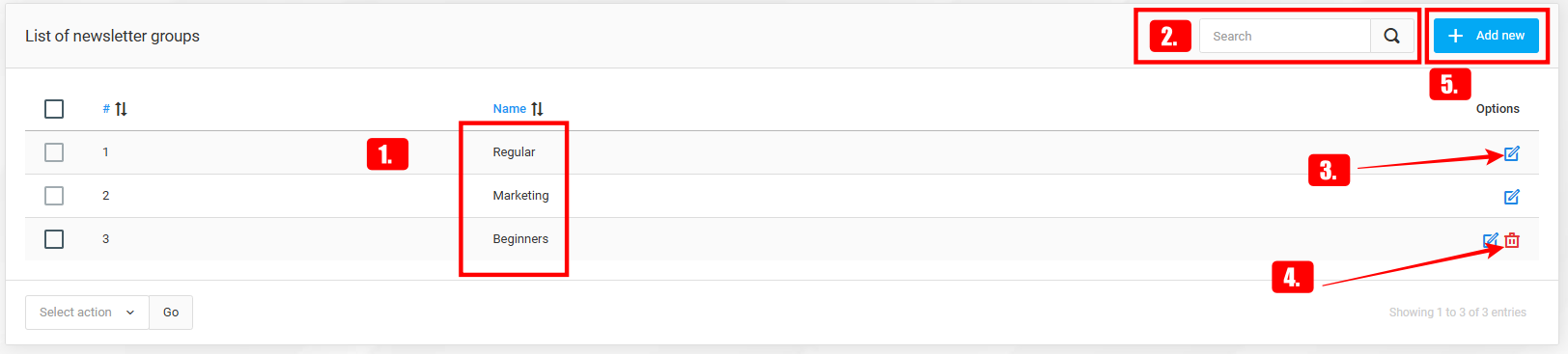
- Marketing – This default newsletter group is reserved for marketing purposes. Subscribers are added to this group only if they check the "I want to receive marketing messages to my email" checkbox during the subscription process.

Beyond the default newsletter groups, there is no limit to the number of additional groups that can be created. By adding more newsletter groups, store owners can customize their targeting to align with unique marketing strategies.
IMPORTANT: Subscribers are automatically placed into the default newsletter groups, depending on which option they selected during the subscription process. In the case of custom groups, whether existing or entirely new subscribers are added, this must be done manually.
IMPORTANT:
Name – The name of the newsletter group.
To search for a newsletter group, simply type its name into the search bar and click the "magnifying glass" icon.
By clicking the "edit" button, store owners can modify existing newsletter groups.
If a newsletter group is no longer needed, administrators can delete it by clicking the "trash" icon.
New newsletter groups can be added at any time by clicking the "Add new" button.
Adding or editing newsletter groups
To create a new newsletter group, simply provide its name in all the languages used by the store.