This section lists the 10 most recent orders with a "New" status in chronological order, based on when customers placed them. An empty list indicates that all new orders have already been processed and moved to a different status.
- ID - The order number, used to reference the order within the system.
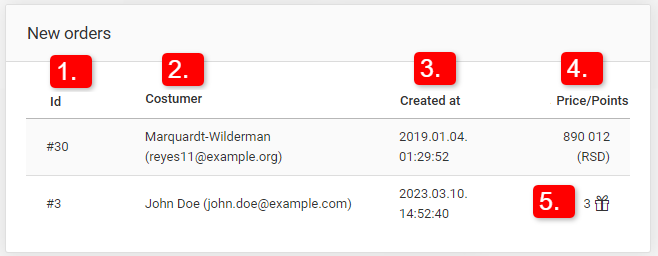
- Customer - The name and email address of the customer who placed the order.
- Created at - The exact date and time when the order was placed by the customer.
- Price/Points - The total order value in the store's currency (or points, if the order was purchased using loyalty points for a gift).
- The "gift" icon indicates that the order is a gift order, paid for using loyalty points instead of the store's currency.
Clicking on any order entry redirects the store owner to the order’s edit page in the administration panel.